Sep 18, 2009

Wrist hurting : Go get yourself ergo keyboard and mouse

If your wrists hurt while or after using computer, it is time to look out for the cause. The symptoms may very well be of RSI.

A quote from BBC :

…

There are almost half a million sufferers of RSI in the UK - many of these have conditions caused by computers.

…

Up to 4.2m working days are lost in Britain each year through employees suffering upper limb disorders - costing employers at least £200m.  

In India , however the situation is not aggravating. But, with the internet reaching nook and corner and technological advances affecting peoples’ lifestyle, the day is not far when India with mammoth size of population will outrun every country in number of patients suffering from RSI.

There is no silver bullet approach of treating RSI. Various factors ranging from lifestyle ,work conditions to your diet might be responsible for RSI. See a qualified physician to diagnose the exact cause. Sooner the Better (I was lucky): especially, if your life revolves around computers. If you ignore your symptoms, the worsening pain will leave you crippled and at one time you might have to give up typing!

One common factor affecting RSI patients is related to work conditions. Notice, how do you sit while working (don't hunch back or sit casually) , how do you use your keyboard or mouse ( In what position or angle do you lay arms to use keyboard, or mouse). This post focuses on the later aspect and points out the differences between normal and ergonomic keyboard.

The intrinsic problem with normal keyboards and mice is that they don't conform to your neutral body posture. They force normal body posture to change to allow their usage. Example: Note in the picture below how normal keyboard forces you to bend the wrist at outer side. This causes straining of wrist muscles.


image


The ergonomic keyboard encourages neutral wrist alignment so you can work without discomfort.

image

Think of the strain that is put on your wrist (actually on wrist tendons : nerves connecting muscles and bones) ,multiplied by the number of hours spent working when using normal keyboard. This is the reason why 80% developers have experienced symptoms of RSI sometime in their life.


Similarly, normal mice do not encourage normal posture.

Note the posture of your forearm while using normal mouse. The forearm lays flat on supporting surface causing twist in your arm (Neutral position is when you lay forearm in vertical handshake position). This coupled with the fact that when moving mouse while your hand is in motion, your forearm stays still, thereby straining wrist tendons further (add to it the strain caused by keyboard) and further aggravating the pain. That’s where ergonomic mice are useful.

ergo mouse posture


The ergonomic mice come in certain types.

Vertical Mouse

This type of mouse require you that you hold your hand in handshake position which also happens to be the neutral position of forearm. Hence, no twisting in forearm and thus alleviating forearm pain. The forearm actually moves along with hand when held in vertical position, thus preventing the straining of wrist muscles and relieving wrist pain.

Trackball Mouse

This category of mouse are more popular than vertical mouse among RSI sufferers. The mouse movement with the hand is not required at all. Rather trackball is moved using your thumb (when trackball lies under thumb) or fingers (when trackball lies under middle finger) to move the mouse pointer on screen. They are more effective in reducing wrist pain since the wrist is not moved at all.

image


Where to get ergonomic mouse and keyboard in India:

Some of the best ergonomic trackballs are manufactured by logitech (source : lifehacker). But unfortunately none of them is available in India. I was looking to buy Logitech Cordless Trackman Wheel and found it to be eligible for international shipping to India at amazon.com. So, I ordered it and it was delivered in just 4 days (I must say I am impressed by their speedy delivery and greatly impressed by shock proof, easy open packaging – rare to be seen in India). With a retail price of 37$ and shipping and import duty of 28$, total cost came out to be 65$ (Rs. 3200).


Among all the ergonomic keyboards available in Indian market, nothing comes close to Microsoft Ergonomic Keyboard 4000 at all in terms of comfort, design and price tag. I bought this one from Netcom Computers in Nehru place(they offered the cheapest rate) at the price of Rs. 2650.

Considering that about one third of the rest of your life time will be spent on computer and related activities, it is actually a very good idea to invest in setting up an ergonomic interface to avoid RSI problems in future.

Sep 4, 2009

Shop online safely using your debit card (India users only)

Many of us are constrained when it comes to shopping online since most of online shopping sites require you to have a credit card. Also, people (particularly in India) are paranoid of online identity theft. Enter the HDFC bank, which has this god send (read the side note later) service of Netsafe which allows you to shop online at any site using any of its debit card. It does so by allowing you to create a disposable virtual credit card using your debit card. For this, HDFC Bank has special tie ups with VISA and MASTERCARD.

HDFC Bank Netsafe virtual credit card

Just register with your debit card details on HDFC bank’s website and you are ready to create your first virtual credit card. Fill in the credit card limit, the amount is automatically transferred from your debit card to virtual credit card. The virtual card generated is for one time use only and expires in 24 hours. This ensures the legit use of card. If the card is not used in this time , entire amount is transferred back (without any deduction) to your debit card with 3-4 days. This service is absolutely free. Citibank is the only other bank that has similar service in India. Update: ICICI Bank and Kotak Mahindra bank also provide similar services in India. I expect PSU banks in India to to take a cue from HDFC Bank on this one.


HDFC Bank Netsafe

ICICI Bank Virtual Credit card

Kotak Mahindra Bank

On a side note, after being diagnosed with symptoms of RSI, I was in immediate need of a particular ergonomic mouse. Not finding it anywhere in Indian market, I decided to order it from Amazon.com (Yes, Amazon delivers certain items to India). That’s when I used the HDFC Netsafe facility for first time.

Oct 29, 2008

How to backup drivers and restore them later

How many times have you found the drivers missing after doing a clean install of windows and then hunting online forums for correct drivers because you don’t have drivers CD for hardware that came preinstalled while buying pc. What’s worse is when they are unavailable online.

image

Luckily Double driver comes to your rescue. Now if you purchase a computer, you can backup the initial set of drivers with double driver. Double Driver scans for all the drivers installed on system and categorizes them Microsoft/Non- Microsoft(see the image above). You can selectively backup the Microsoft or Non-Microsoft drivers which can be easily restored at a later point in one go. Double Driver is freeware (windows only).

Double driver

Jul 22, 2008

Store any IM chat logs online with Dexrex

image The Dexrex Extensions package is a set of ad-free, spyware-free IM plugins that run on your computer to connect your instant messaging client to the online Dexrex account. Dexrex detects any popular IM client running on your desktop and gives a choice to link with the running IM client which then monitors your chat conversations and stores them in your online account at dexrex. All major IM clients including AOL Instant Messager (AIM), Google Talk / Jabber, Windows Live Meesnger (WLM), Skype and Yahoo! Messenger are supported, full list here.

Alternatively, you can login the web client with Dexrex screen name and password which automatically save chat logs. You can also import older saved chat logs(from some IM clients) to dexrex. This gives the convenience of browsing and searching across the whole chat archive from any computer.

If you are paranoid of sharing chat logs with third party but trust Google, you may archive all chat logs of Yahoo messenger or MSN or any IM client inside Gmail.

Dexrex

Jul 20, 2008

How to remove programs from Open With menu

Here is how to trim down your Open With menu if it contains undesired applications for a particular file extension or if your Open With window displays too much applications, and you want to remove the applications that you don't use frequently.

1. Manually editing registry: Open the run command from start menu, then type regedit to fire up the registry editor. Navigate to the following entry:

 HKEY_CURRENT_USER \ Software \ Microsoft \ Windows \ CurrentVersion \ Explorer \ FileExts \ .FileExtension \ OpenWithList

.FileExtension is the extension of file with which you want to disassociate the program in Open With menu. Now, look for the programs under the data field and simply delete the undesired entry.

image 2. Using software called as OpenWithView : Download the zip file, open it and run the standalone exe.  Select the program from list and disable it to remove from Open With menu. When program is disabled, it won't be displayed in the 'Other Programs' section of the 'Open With' dialog-box also.

Jun 23, 2008

How to temporarily disable writing to USB

Prevent USB from virus infection or someone from stealing data using his USB, by temporarily disabling writing to any USB device. There are two methods for doing this:

1. Manually editing registry: Open regedit from start->run and browse to following entry:

HKEY_LOCAL_MACHINE\System\CurrentControlSet\Control\StorageDevicePolicies\WriteProtect [Note: Be careful while editing registry]

Change the dword value between 00000001[disable write] to 00000000[enable write]. Reboot the system for changes to take effect.

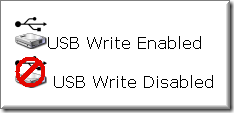
image2. Using software called as UltraBlock USB Write Blocker: Simply click on the icon in system tray and choose the menu item to toggle write access. All Thumbscrew really does is flip a bit in the registry at:

HKEY_LOCAL_MACHINE\System\CurrentControlSet\Control\StorageDevicePolicies\WriteProtect

[via My Tech Quest]


Related:

Shield yourself from USB viruses without any AV

Jun 21, 2008

Decrease your click count with these windows utilities

Are you tired of digging those deep nested folders in windows explorer?  You opened a folder 10 clicks down and closed it accidentally. And now you don’t feel like clicking again for that recently accessed folder. Wish windows had My Recent Folders’ list like the My Recent Documents’.


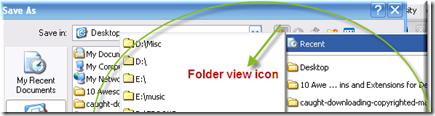
1.  Folder View is freeware add-on(windows only). It can remember your most recent folders visited and pops them up in a list everywhere you may think of. Access recently used folders’ list and quick access list( like the favorites inside explorer), from system tray, or inside ‘save as’ dialog boximage

imageexplorer) from system tray, inside ‘save as’ dialog box(very, very useful here) or an optional toolbar inside explorer. While Windows can remember your most recent files(in My recent files’ list), Folder view remembers most recent folders, definitely useful when you accidentally close one of those deeply nested folder and don’t want to dug again to open it.


image2. Another utility which is very much like Folder view is FileBox eXtender with an easy option to add/delete currently open folder  to ’ quick access list’ and features such as “roll up window” and “stay on top”.


image3. Finally, if you haven’t switched from XP to Vista, QT Address Bar is a freeware which provides breadcrumbs navigation in windows explorer.

Breadcrumbs typically appear horizontally across the top of a web page, usually below any title bars or headers. They provide links back to each previous page that the user navigated through in order to get to the current page, for hierarchical structures usually the parent pages of the current one. In case, you want to copy or paste onto address bar, just click on the small arrow on the right- this will allow you to hide window’s own address bar(available under View->Toolbars).

(System Requirements for QT Address Bar: Microsoft .NET framework 2.0 or later)


image4. If you are satisfied with your trusty keyboard, reduce your keystrokes with launchy.


image

5. Firefox fans get some more reasons to be a bigger fan of firefox with these click reducing add-ons.


Jun 12, 2008

Decrease your click count with these Firefox add-ons

Sometimes big productivity comes in small packages. Taking a clue from this, let us talk about two Firefox add-ons that I have got hooked to since I started using them.

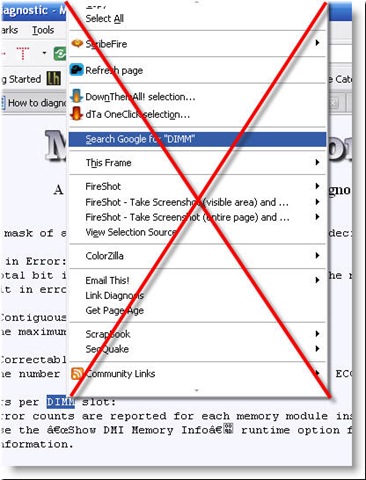
Conventionally, to do a Google search of some text on web page, you select a portion of text, then right click and from the context menu that appears, you select search Google for "selected text here". But context menu becomes clumsy as list of items inside it grows and it is difficult to search across large list of items in context menu.


conventional way of searching


 Drag and drop zone searching


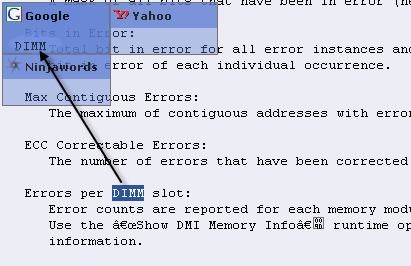
Drag and drop zone searching is an innovative way of doing Google search. Just select the text, drag it. A stylish transparent grid (in the color of your choice, see screenshot above) with all your Search Engines will be displayed over the site you are viewing, and the DropZone you are currently hovering above will be highlighted. Just Drop the text on any of the DropZones and your search will be performed the way you were used to. The advantage here is that you can search across any of installed search engine rather than limiting to only one in context menu and that too in a cool way.

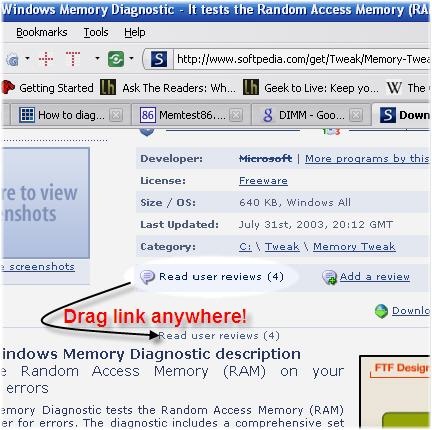
Super drag and go is one add-on in my opinion which should be integrated into firefox. Drag a link or anything like a url (e.g. http://superdragandgo.mozdev.org), and throw it to anywhere blank on the webpage to open it in a new tab. Dragging a link is of course a lot better than middle clicking it. See the screenshot below:

super dragandgo

These add-ons will enrich your web surfing experience. If you know of any click saving apps or add-ons, let us know in comments.

May 31, 2008

How to find the date a web page was created ?

Do you often need to know when was a particular web page or web site created?  This might be useful for knowing when a notification appeared on some web site or verifying content theft cases. Firefox add-on Link Diagnosis(compatible with FF3) can reveal age of only those pages which are indexed by Google. Basically, it gives the date when the web page was first indexed by Google: it doesn’t matter if it is later modified. It doesn’t give the modification date but the creation date of web page. Given the speed with which Google indexes even the lower rank web pages these days, the add-on looks promising in providing the accurate age of the web page.

It uses the advanced Google search. Consider this link :

inurl:http technolaziness blogspot com

For this query, Google also returns the cached date along with the links. See the screenshot below:

image

Link Diagnosis brings the same functionality through a simple user interface.


image


image 

Just install the extension and you will be able to find out the age of the page with only two clicks. Just right click on web page and select Get Page Age.

[Link Diagnosis Download link]

Related : Monitor a web page for change

Create automatic USB/CD (as inserted) shortcut on desktop

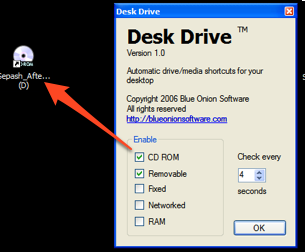
What do you do when you insert removable media like CD, DVD, or USB drive. Obviously, you open My Computer to find the mounted media unless you have enabled autoplay. If autoplay is enabled, a set of possible actions pops up inside a dialogue window form where you directly access the media . If you have disabled autoplay, won't it be great if inserting a new media automatically creates a desktop shortcut pointing to new media. You are spared from hunting for meaningless drive letters inside My Computer. Desk Drive does exactly that. Remove the media and the shortcut goes away.
image
Sounds like a nice click saver for me. But it comes with a memory hog of around 16 Mb ram(4 times more than ideally such an app should consume). So, it is definitely not a worthy install if you are low on memory.
Requirements :
Windows XP/Vista
.Net Framework 2.0

May 20, 2008

Shareaholic -Flock browser killer is here

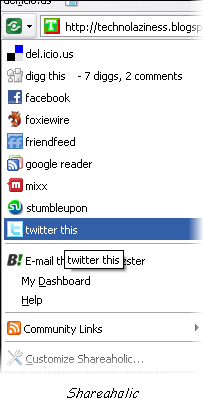
Even before Flock browser could gain substantial web presence- it faces the threat of extinction to the hands of firefox extension Shareaholic. If you are into submitting urls to social bookmarking sites then firefox extension Shareaholic is for you. No more looking for web publisher provided buttons, and no more bookmarklets piling up on your toolbar. Submit to almost all the well known social bookmarking sites on Internet space with this nifty tool. You can share the link by email using a third party service provided by Bzzster. It quickly evaluate web page popularity by telling you the number of times the web page you're on has been dugg or saved to del.icio.us.

image

So is Firefox+Shareaholic = Flock ?
Doesn't believe it yet? Shareaholic was the Grand Prize winner of Extend Firefox 2, a Mozilla sponsored contest for the best Firefox addons.

Link: Shareaholic addon

Shareaholic website

May 19, 2008

'Double Click-Open with' problem solved

I have been encountering this windows error very frequently:

Whenever I click on my hard drive, it opens a Open With window.


This is because more and more malwares are resorting to 'autorun.inf' file tactics.

Q:What is autorun.inf?

A:Autorun.inf is basically an optional file in the root directory of CD which contains instructions for what action to perform as the CD is inserted. These instructions can include, for example, a command for an installation program to be executed. Autorun.inf file can also be associated with drives on your system. When you double click the drive icon in 'My Computer', instructions in the autorun.inf file are run.

Q:How does it spread?

A:These type of virus infections are commonly spread by portable USB drives. The moment you click on the USB drive which is already infected by virus, the virus creates replica of autorun.inf file in your entire system under each drive.

Q:How to fix them?

A:Geeky solution for Deleting Autorun.inf files :

Open task manager and end the "wscript.exe" process
Click Start, Run and type cmd,
run these commands:

-------------------------
cd\
c:
attrib -h -s -r *.inf
del *.inf
-------------------------
Try this for all of your drives. You might need system restart after this.

You may also encounter one of these system restrictions:

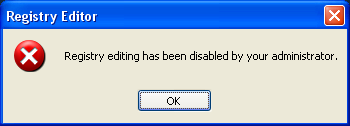
1 - Disable Registry Tools >> so the user can't see what is going on during system startup!


Geeky solution for Enabling Registry Editor:

Click Start, Run and type this command:

REG add HKCU\Software\Microsoft\Windows\CurrentVersion\
Policies\System /v DisableRegistryTools /t REG_DWORD /d 0 /f

Click OK.


2 - Disable Folder Options >> so the user can't set the option to show hidden files!


Geeky solution for Enabling Folder Options:

Once registry editor has been enabled, click Start, Run and type regedit, browse to the entries given below and edit these dword values:

[HKEY_CURRENT_USER\Software\Microsoft\Windows\
CurrentVersion\Policies\Explorer]"NoFolderOptions"
=dword:0000000

[HKEY_CURRENT_USER\Software\Policies\Microsoft\
Internet Explorer\Restrictions]"NoBrowserOptions"
=dword:00000000


3 - Disable Ctrl+Alt+Del (Task Manager)>> so the user can't see the virus and the other applications running!


Geeky solution for Enabling Task Manager:

Click Start, Run and type this command exactly as given below:

REG add HKCU\Software\Microsoft\Windows\CurrentVersion\
Policies\System /v DisableTaskMgr /t REG_DWORD /d 0 /f

Click OK.


Ungeeking the task:

Autorun Eater is a tool that removes any suspicious 'autorun.inf' files in real time, even before the user attempts to access the drive. It will prompt the user before any autorun.inf file is deleted. Besides this the tool is also capable of removing above three common system restrictions made by virus.

Sergiwa RRT(Remove Restrictions Tool) is a useful troubleshooting utility to clear around 30 more restrictions like the one mentioned above. You can find the complete list on the developer's site. Though it doesn't eat autorun.inf files!


Related:

Q: How
to bypass autorun on USB/CD?

A:Autorun could be bypassed by holding down the Shift key for 5-10 sec as the USB or optical disc is inserted. However, this is no longer true starting with Windows Vista.

• Search Companion Starts If You Double-Click a Folder

May 11, 2008

How to place images between words in Gmail

After coming across a very interesting service on Technospot, I eagerly tried it and went on to sharing its results with friends through email. But there was a hitch midway: Gmail does not support inline images.

Google Help center says:

Google Mail doesn't currently offer the ability to attach images inline, because we don't support HTML formatting.

That made me wonder how have I been receiving those inline images in Gmail for so long. That means there must me a way out. I finally turned to Google for help: results were not satisfactory. Some results suggested downloading flock browser, then setting up Flickr account.. so on....a process too long for me. I was looking for something plain and simple which I found after digging through more pages on Google.


Here are the step by step instructions for embedding images inside Gmail:

  • Upload the image on web server using free image hosting services like MediaFire.
  • Open the image located at a web server directly in your browser.
  • Click the image with right mouse button and select View image from the menu.
  • Hit Ctrl-A; then Ctrl-C.
  • Open Gmail Compose Mail window.
  • Make sure Rich formatting is turned on in Gmail (It is ok if you see « Plain Text above editing area(see above image)).
  • Position the cursor in the editing area where you want image to appear.
  • Finally hit Ctrl-V.
That's really simple! Continue composing message.

Apr 27, 2008

How to download Yahoo Messenger Offline Installer directly?


There is no way of installing Yahoo Messenger offline. It requires you to be online till setup is complete and if you loose connection midway, there is no way to resume installation. This is mine one of the most compelling reasons for not using Yahoo Messenger. This means every time I format my computer, I have to download it....there is no way I can have a copy of its setup. I have to go to Internet, download that 'partial installer' which finally installs it.

But with a little hack, you can download setup file directly and install it offline. Simply prefix the file name of online installer file with 'y'.


The URL for downloading yahoo messenger online installer is:

http://us.dl1.yimg.com/download.yahoo.com/dl/msgr8/us/msgr8us.exe.


To download full complete standalone installer setup file directly, use this URL:

http://us.dl1.yimg.com/download.yahoo.com/dl/msgr8/us/ymsgr8us.exe.


Here is the direct download link. See how the name 'msgr8us' near the end of link is changed to 'ymsgr8us'. The trick works with all versions of yahoo messenger. Happy IMing!


[via blog.ashfame] 

Download other offline installers:


Related:

How to save Yahoo Chat log online?

How to Login Mutilple Google Accounts at once?


Blogged with the Flock Browser

Apr 20, 2008

How to convert large pdf into plain text

You often need to extract plain text from a large PDF. For example, my mobile phone's(Ktech K880) Ebook Reader doesn't provide support for PDF format. It only supports TXT format. If the PDF file size is large , simple copy and pasting text is often a hassle and barely feasible. After googling and carefully reviewing the various options of converting PDF into text, I settled with A-PDF Text Extractor.

A-PDF Text Extractor is an utility designed to extract text from Adobe PDF files. The program is a standalone application. No Adobe Acrobat needed. The program is freeware, which means that you can use it either personally or commercially for free.

Requirement: Windows 98/NT4/Me/2000/XP


For Mac users:

You can convert the pdf files into text online with PDFTextOnline. Here, you first upload a PDF document. PDFTextOnline extracts the first 10 pages of the PDF, returned to your browser using AJAX technologies, and is rendered in your browser in real-time. If you then browse beyond the first ten pages, PDFTextOnline will again extract another 10 pages of PDF text, which is returned to your browser and used to update the PDF document view already in place.

Extracted text can be saved: Just click the 'Save All Text' after you have uploaded your PDF document. Further, font and page layout can be adjusted while browsing pages online.


Blogged with the Flock Browser

Apr 15, 2008

How to save Yahoo and MSN chat log online

Almost every one of us has an account with both Yahoo and Google. And, you probably use both Yahoo Messenger and Google Talk to stay in touch with buddies. Unlike Yahoo ,Google offers the web-based version of Google Talk . But you can also get web IM for Yahoo using services like Meebo, or ebuddy . These services though don't provide any online space to store your yahoo chat log specifically( Yahoo chat log while using Yahoo Messenger is stored locally. Hence you can't access your yahoo chat log when you login from another computer). So, there is no way you can access it while on the move. But don't loose your heart.... Google comes to your rescue again.


With Google Talk, conversations are archived and stored inside Gmail in the same manner as emails. This allows users to search within their chat logs easily. It would be great if I can transport all my Yahoo contacts to Google Talk so that all my Yahoo buddies are also visible in Gmail chat window. This way I can chat with Yahoo buddies while still in Gmail and therefore, all Yahoo chat log can be stored in Gmail and my purpose of accessing chat logs from anywhere is fulfilled. Now the billion dollar question : How could it be possible to transfer Yahoo contacts to Google Talk. Here is a nice tutorial which will guide you through this process.


The set up process requires cross platform Jabber client Psi and is a one time set up process( i.e. you can uninstall Psi after you have transferred the contacts). The similar process applies to your MSN/AIM contacts.

Related:


Q:Where is Yahoo chat log stored by default?

A:Yahoo Messenger saves chat log at C:\Program Files\Yahoo!\Messenger\Profiles\your Yahoo! ID\Archive\Messages.


Q:If I uninstall Yahoo Messenger, will I lose my chat logs or call history?

A:No, provided you set this option:
Messenger->Preferences->Archive->Yes, save all of my messages or call history.
 

Update: Here is how to save your any IM’s chat log in Dexrex online account. Dexrex detects any popular IM client running on your desktop and gives a choice to link with the running IM client which then monitors your chat conversations and stores them in your online account at dexrex.

Apr 13, 2008

Login Multiple Google Accounts at once


If you maintain multiple Google Accounts at once and access Google services with multiple Accounts(For Example : I access my Gmail with an account different from the one I use for Orkut), there is a restriction that you can't login to multiple Google accounts at once from same browser. If you sign in to different Google account, you are automatically signed off from already logged in account. This restriction is mainly because an Internet browser maintain only a single set of cookies for a particular type of Account. Users typically log in by inserting their credentials into a login page; cookies allow the server to know that the user is already authenticated, and therefore is allowed to access services or perform operations that are restricted to logged-in users. Once you login with different account, those set of cookies are overwritten with cookies corresponding to newer logged in account. Can you really login multiple accounts at once?

The solution is CookiePie Firefox extension. This extension allows you to maintain more than one set of cookies so that you can use Google Services with different Google Accounts at the same time(For Example : I can now access both my Gmail and Orkut with different Google accounts simultaneously). Though, with this extension you can't login two different Gmail accounts at same time or two different Orkut accounts at same time. If I have two Gmail accounts one at abc@gmail.com and other at xyz@gmail.com, this extension doesn't facilitate you to login both of these Gmail accounts simultaneously i.e. service type(here->Gmail, and Orkut) I use at one Google account(say abc@gmail.com) has to be different from service type I use at xyz@gmail.com. With the aid of this extension, I would rather be able to use orkut at abc@gmail.com and Gmail at xyz@gmail.com at the same time. This is what I found after using it and sounds more logical too.

Another option is IE Tab Firefox Extension. This extension, however will let you login two different Gmail accounts at same time which was not possible with the CookiePie extension. This is a Firefox extension that basically allows you to run IE within Firefox. Since IE is loaded into a Firefox window, it’s still maintains it’s own separate set of cookies and therefore allows you to manage two profiles or accounts at the same time.

Mar 21, 2008

Spam Killer : Use Disposable Email Address


Checking for emails in your mail account filled with spam can be a real productivity killer. While registering on any website, you are almost always required to provide your email id. But on some sites you wouldn't really like doing it for the fear of lifetime of junk mail and spam. Or in some "cases" you might wish to hide your actual identity. I would rather have a use and throw or disposable email id for websites that require one time confirmation and thereafter I am not concerned whatever emails they send to my account.


A disposable email address can be used for several reasons.

  • You want to use a service on a web site that requires a confirmation through email, and you know that this site will sell your address to third parties; with a disposable email address, you can confirm the link that was sent, yet you won't receive any advertisement that would be sent afterwards.
  • You want to participate in a forum, and receive replies through email, yet you don't want your email address to be gathered by robots. Thus the robots will only get the disposable address, and you won't receive any ads.

Here is a list of services along with their features that allow you to have disposable email id:

1.Mailinator.com : Creating an account is fairly simple. Just provide any email id like jade@mailinator.com in a forum or while registering on a website and there after check your email account at mailinator.com. No sign-up, you don't even have to tell Mailinator you're coming. You can check mailbox on the site via RSS, via a widget!, or via your web browser. After a few hours, all mails sent to mailinator will be auto-deleted. There's no password. The email name itself is the only key you need to get in. So, try picking unusual name for privacy reasons. You can't forward mail from mailinator to other email accounts.

2.spam.la : This service is very much similar to mailinator and interface is very intuitive too.

3.Jetable.org : I am really impressed by the way this service works.To avoid spam, jetable.org provides you with a temporary email address. As soon as it is created, all the emails sent to this address are forwarded to your actual email address. Your antispam address will be deactivated after the lifespan you selected comes to its end.It really deserves a try. Oh, did I tell you that this service has got a firefox extension too. And it works awsome : Just right click on email address text box/field inside the web page, click on "get jetable mail" and it autofills that field!


4.Guerrilla Mail : The service is very different from above trio. To get a disposable email id, you first have to visit their site. On the home page, there appears a temporary email id which you can use as disposable email id. The id itself expires after 15 minutes. You can read and reply to e-mails that are sent to the temporary e-mail address within the given time frame.

Other similar services that came to my notice are PookMail.com, myTrashMail.com but haven't given them a try. Of all the above services, I think I will stay with Jetable.org.
Let us kill spam. Help in to publicize this article.

Related posts:

Mar 16, 2008

How to copy and paste text online ?

I often come across situations when I need to send a large text file to someone. I really don't like switching to email for this purpose. I would rather send the long text using IM. But what if text is too long and also text formatting in IM is not preserved. Here are the three applications that you can use to copy text online via internet.

1.Textsnip - Paste in your text and you get a URL that you can give to anyone… when they go there, bam!Your nicely formatted text. You can also create account to keep track of your textsnip links. It is absolutely free to use and no sign-up required to get started. Here are the possible reasons to use textsnip:

  • STOP losing your clean, tabbed format.
  • EASILY paste code examples in to a blog, forum, or any website.
  • DON'T breakup text over 10 different Instant Messages due to character limits.
  • SIMPLE text sharing without the use of E-mail.
  • CLEAN display of code in the nice, color-coded format that it was meant for.
  • CREATE an easy to remember custom url.

2. Pastebin - Patebin promotes itself as a collaborative debugging tool i.e. you can use it to share your programming code written in different programming languages, and preserving indentation thereby. Here are the main highlights :
  • When you view a post, you have the opportunity of editing the text - this creates a new post but when you view it, you'll be given a 'diff' link which allows you to compare the changes between the old and the new version. This is a powerful feature, great for seeing exactly what lines someone changed.
  • It allows to specify the time your post should be retained : a day, a month, or forever.
  • You get a private pastebin simply by thinking up a domain name no-one else is using, e.g. http://private.pastebin.com. Posts made into a sub-domain only show up on that domain. This in my opinion is the most interesting feature to use.
3. Cl1p.net - This service is different
from above duo in the sense that it accepts from you to provide a URL that starts with http://cl1p.net and then you can paste anything you want. The site cl1p.net is powered by Clipboard Core. Clipboard Core is a web-based service that you install in your network. Once installed, you can enter in any URL. Once the clipboard core is setup there is no other client software to install. The service is available for a 30 day evaluation period only . Users can collaborate on a document by adding their comments. The add-on is that you can upload your files over 2 MB if you don't feel like copying entire text.


Mar 8, 2008

YouTube URL hack : Watch videos at higher resolution

If you are unimpressed by the substandard quality of videos available at YouTube11, think again since it may no longer hold true. Youtube videos till now could be watched only at a resolution of 320x240. Now if you just append &fmt=6 at the end of video's url, the resolution increases to 448x336! Add &fmt=18 and get an mp4 encoded video and 480X360 resolution!! However there exists an obvious trade-off between video quality and its bandwidth. So be sure, what you want to prioritize.

If the video's url is

1http://www.youtube.com/watch?v=PjzLUYJQoY8

simply append &fmt=6 at the end of url as

http://www.youtube.com/watch?v=PjzLUYJQoY8&fmt=6

and you get 448x336 resolution video.

Check out one such 480X360 resolution video :


Related : Check out the Greasemonkey script22 to download high resolution videos.

The trick seems to work with newly posted videos.

Related Posts

Liked the article then Subscribe to Technolaziness by Email or grab our feeds .